

Are You Managing Your Email, or Is Your Email Managing You? 68% of Professionals Can't Answer That Question. And That's Exactly the Problem.
You open Outlook in the morning. There are 87 new emails. Some are urgent, some are FYI, some are newsletters you never subscribed to...
3/12/20265 min read
Introduction: Email Isn't a Technical Problem — It's a Control Problem
You open Outlook in the morning. There are 87 new emails. Some are urgent, some are FYI, some are newsletters you never subscribed to, some are 40-message threads where nobody has answered the original question yet. By the time you've figured out what's actually a priority, you've already lost 40 minutes.
The paradox is that Microsoft 365 — the platform you use every day — already has all the potential to solve this problem. You were just missing the intelligent layer on top.
Enter Inbox Hero: an AI email manager built specifically for Microsoft 365 and Outlook, that transforms your inbox chaos into an organized, prioritized, and almost fully automated workspace.
The Problem: How Much Time Are You Actually Losing to Email?
The answer is probably more brutal than you think. Research consistently shows that the average professional wastes between 2 and 3 hours per day on email management. Not replying to email — managing it. Deciding what to read, what to archive, what to delegate, what to ignore.
Multiply that by 250 working days per year: you're looking at 500 to 750 hours of pure manual labor annually on an activity that produces zero direct value. It's the equivalent of a full-time employee whose only job is to sort the mail.
The Problem Within the Problem: Outlook's Focus Mode Isn't Enough
Microsoft Outlook already has a feature called Focused Inbox, designed to separate important emails from secondary ones. Great in theory. In practice? It works with sufficient accuracy only about 40 to 50 percent of the time for business users with high email volumes and complex communication contexts.
The problem is structural: Focused Inbox uses static rules and generic criteria that don't understand the context of your specific work — who your key clients are, which threads need your urgent reply, which messages are operational and which are purely informational.
"You don't have an email problem. You have a priority problem. And machines, properly trained, are better than humans at managing priorities at volume."
Analysis: How Inbox Hero Works and Why It's Different From Everything Else
The Architecture: No Data Leaves Your Microsoft Tenant
Before discussing features, let's address the elephant in the room: security. Many professionals and IT directors are rightfully cautious about AI tools that require access to their corporate emails.
Inbox Hero solved this problem at its root: all processing happens exclusively within your Microsoft 365 tenant. Data never leaves your geographic zone (you can choose US or EU), is never stored on third-party servers, and is never used to train global AI models. The platform holds HIPAA, GDPR, SOC 2 Type II, and ISO 27001 certifications — the most rigorous compliance standards available.
The result: even the most security-conscious IT director in your organization will approve it without hesitation.
Core Features
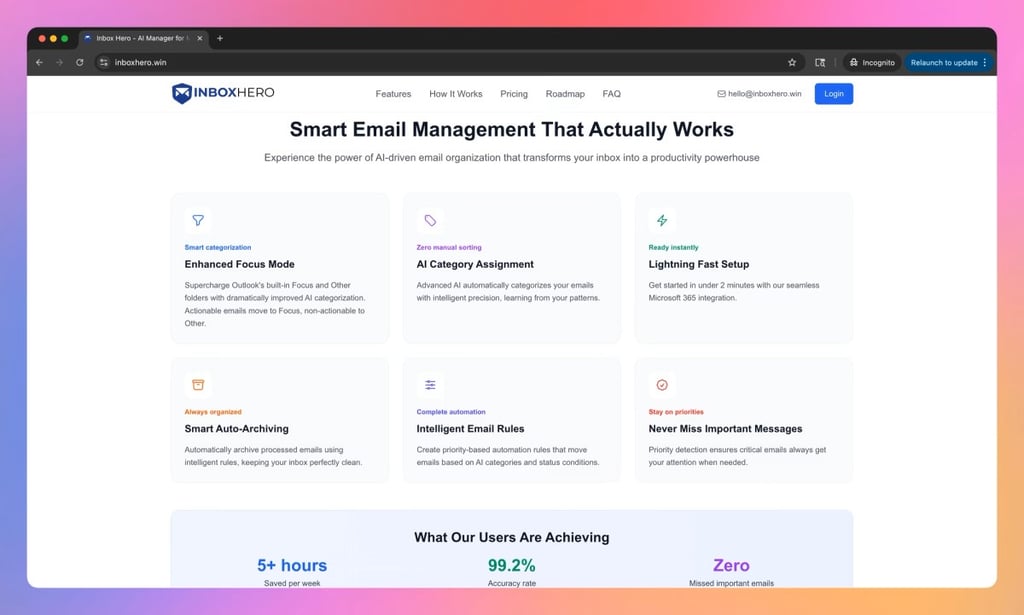
1. AI Categorization — 25+ Intelligent Categories
Every incoming email is analyzed in real time: subject, body, attachments, sender, and conversation history. The system automatically assigns one of 25+ predefined categories — Sales, Support, Finance, Security, HR, Marketing, Operations, and many more — with no manual intervention required.
The crucial difference from other tools: Inbox Hero analyzes the entire thread, not individual messages. If an email is reply #7 in an ongoing contract negotiation, the system understands the context and categorizes accordingly. This is called conversation-level AI processing, and it represents the state of the art in this category.
2. Status Tracking — Always Know What Requires Action
Every email receives a visible status directly inside Outlook: ToDo, Reply, Review, Urgent, Pending, or Completed. At a glance, you know exactly which messages need your attention and with what priority — without opening every single email to figure it out.
3. Enhanced Focus Mode — 95% More Accurate Than Default
Inbox Hero supercharges Outlook's native Focused Inbox with AI categorization that achieves 95% accuracy in separating actionable from non-actionable emails. Operational emails go to Focus. Notifications, newsletters, and low-priority communications go to Other. Automatically. Every time.
4. Intelligent Email Rules — No-Code Automation
You can create custom automation rules that automatically move emails to specific folders based on combinations of AI categories, status, sender, keywords, and attachments. No manual drag-and-drop. No broken rules after every update. The AI understands intent and applies logic accordingly.
5. Smart Auto-Archiving — Permanent Inbox Zero
Processed messages are automatically archived, keeping your inbox clean and empty. The concept of Inbox Zero — often preached but rarely achieved — becomes the default normal state rather than an aspirational goal.
6. Setup in Under 2 Minutes
Inbox Hero connects directly to Microsoft 365 in a few clicks. No technical expertise required. No complex IT configuration. The setup wizard automatically syncs categories, labels, and folders for Outlook. Most organizations are fully operational within 5 minutes of signing up. A free trial is available with no credit card required.
→ Try Inbox Hero free on Microsoft 365 — no credit card required
The Numbers That Matter
2–3 hours saved daily per professional on average
95% accuracy of AI-enhanced Focus Mode
<2 minutes for complete setup
25+ email categories managed automatically
4 compliance certifications (HIPAA, GDPR, SOC 2, ISO 27001)
Who Is Inbox Hero Built For?
The platform is designed for specific professional profiles dealing with high email volumes:
• Executives and Managers: handling hundreds of threads across multiple departments who need immediate clarity on what requires their direct attention.
• Sales Representatives and Customer Success Managers: managing complex pipelines with dozens of active prospects and clients simultaneously. Missing an urgent email is not an option.
• Project Managers and Operations Managers: coordinating teams and processes across multi-participant threads that require context and continuity.
• Executive Assistants and Administrative Assistants: managing someone else's inbox — their efficiency has a multiplier effect across the entire organization.
• Professionals in regulated industries (healthcare, finance, legal): HIPAA/GDPR compliance and zero data retention aren't optional — they're non-negotiable requirements.
Inbox Hero vs the Competition
How does it stack up against well-known alternatives?
• vs Microsoft Copilot: Copilot excels at drafting replies and summarizing threads, but doesn't offer the same depth of automatic categorization and AI-rule-based automation. The two tools are complementary, not competitive.
• vs SaneBox: SaneBox works across multiple email providers but doesn't offer native Microsoft tenant integration or the enterprise compliance certifications required in many industries.
• vs Clean Email: excellent for bulk inbox cleanup, but doesn't offer contextual AI categorization or advanced status tracking.
Inbox Hero's unique competitive advantage: the combination of native Microsoft 365 integration + thread-level AI categorization + enterprise compliance + zero data latency.
The Solution: Turn Your Inbox Into a Productivity Asset
To recap the problem: you're losing 2 to 3 hours per day on mechanical work that doesn't require your judgment. You're using the human brain — your organization's most valuable resource — to do what a machine can do better, faster, and without errors.
Inbox Hero solves this definitively and securely:
• Real-time AI processing of every incoming email, categorized and prioritized instantly.
• Visual status tracking that eliminates inbox anxiety — you always know what's urgent.
• Intelligent automation running silently in the background, even while you're in meetings.
• Enterprise security that satisfies any IT department's requirements.
• Immediate setup with no technical skills needed — operational in under 2 minutes.
If you work in Microsoft 365 — and you handle more than 50 emails per day — Inbox Hero isn't a luxury. It's an investment with measurable ROI in hours recovered every single week.
"Your time is valuable. Email should work for you — not the other way around. Inbox Hero makes that possible."
Start your free trial: → Activate Inbox Hero for your Microsoft 365 and reclaim your hours
Conclusion
Email has existed for over 50 years. For nearly its entire history, we've managed it manually — with rules, folders, flags, follow-ups. In 2025, there is no longer any good reason to keep doing that.
Inbox Hero brings artificial intelligence directly where you need it: inside your Outlook, on your Microsoft tenant, with the enterprise security and compliance that your industry demands.
Inbox Zero isn't a myth. It's a configuration. And it takes less than 2 minutes to turn it on.
Contacts
We are here to help you grow online
HELP
Newsletter
E-mail: info@simplysinth.com
Tel. +39 345 6159899
SimplySynth is a project by Pisano Agostino and Cilento Innovazione Digitale © 2025. All rights reserved.